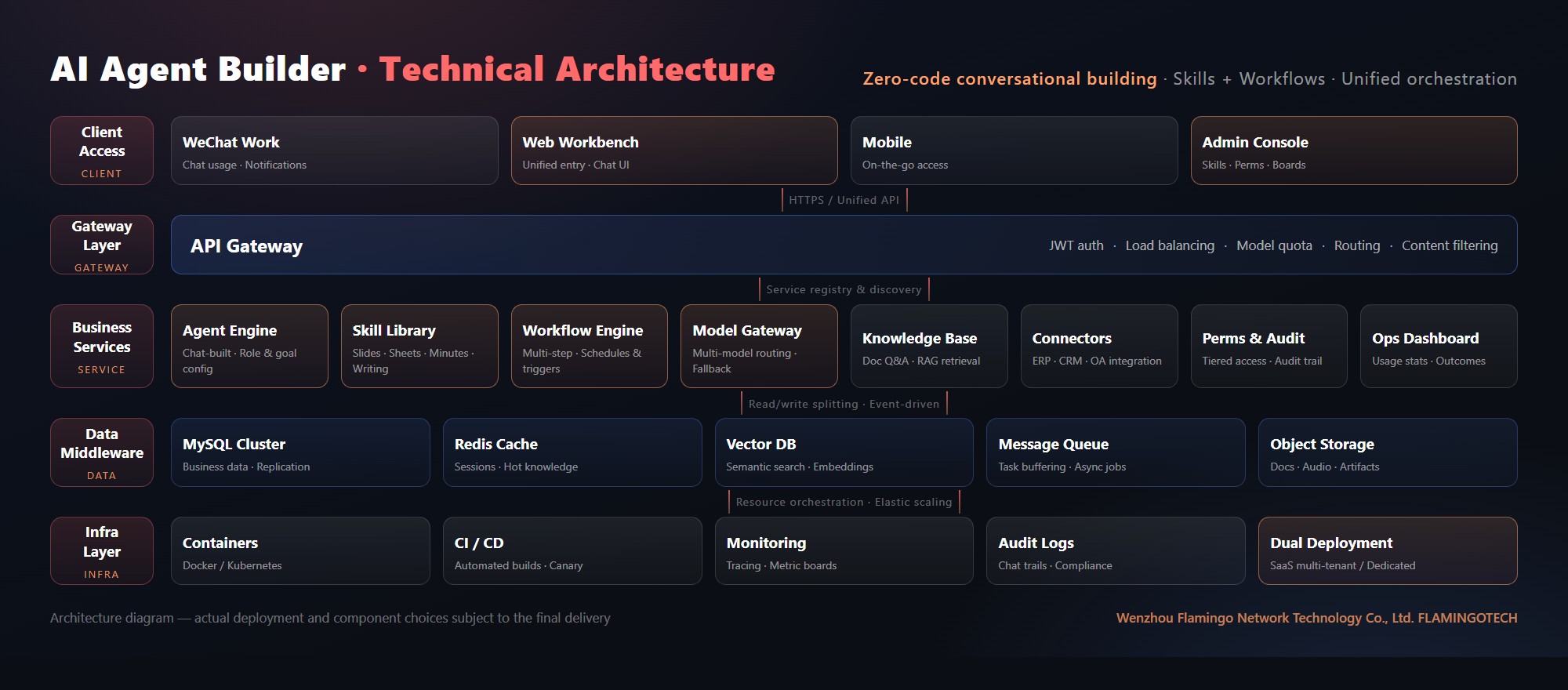
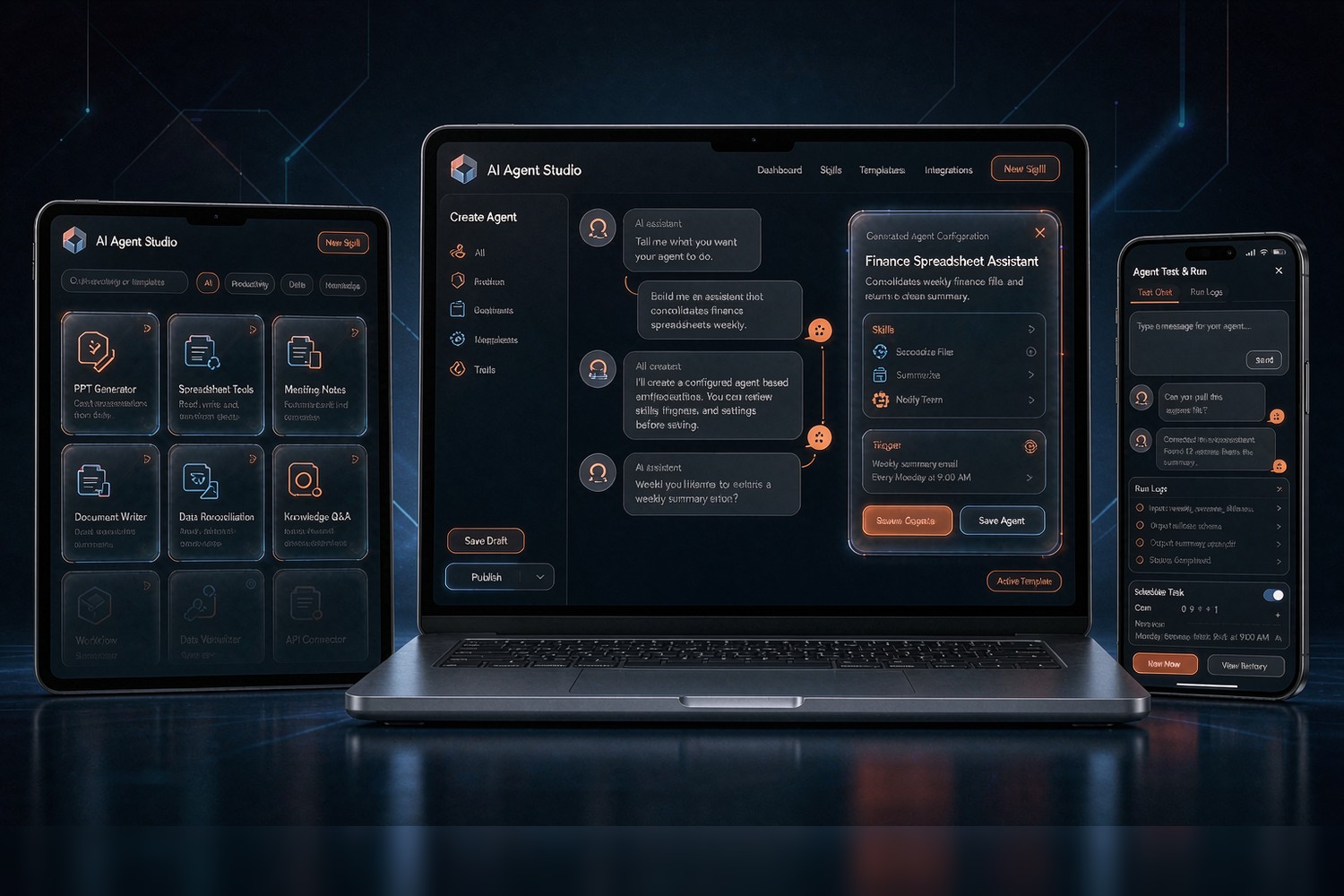
The AI Agent Builder by Wenzhou Flamingo Network Technology Co., Ltd. is a custom agent platform for everyday office work: no coding required — describe what you need in plain language and the platform turns it into a ready-to-use agent. Unlike general-purpose AI tools, it is built around your company's real daily needs: built-in office skills (PPT master, document writing, spreadsheet processing, meeting minutes), skills and workflow automation that combine like building blocks, and connectors that bring ERP, CRM and OA data into one entry point. Everyone works in one dedicated workbench while management sees usage and outcomes on a unified dashboard — turning scattered personal AI use into company-wide productivity.
I cannot code and have no technical background — can I really build a working agent myself?
Yes — that is the core design of this product. Building feels like chatting: describe the need in everyday language (for example, "build me an assistant that consolidates store sales spreadsheets every Monday morning"), and the platform asks follow-up questions — where the data comes from, what output format, who receives it — then generates the agent configuration directly. You preview, test and publish; no code, no developers. Skills are point-and-select: choose "spreadsheet processing" from the library, add a "scheduled trigger" step to the workflow, and combine them like blocks. One-to-one onboarding and documentation are included. The real threshold is not technical — it is clearly describing the repetitive, rule-based parts of your business, and our implementation consultants will work through that with you, usually scoping the first batch of scenarios within a few hours.
Our staff already use general AI tools. Why does the company need its own agent platform?
Scattered use is exactly the most common problem. First, data is scattered: client details, quotes and reports live in each person's private chats and leave when they do. Second, output is inconsistent: ten people using general AI produce ten versions of the same document, with no unified templates or voice. Third, leadership sees nothing: who uses AI, how well, and what it produces is invisible, so nothing accumulates as a company asset. A dedicated platform pulls this together: agents are customised to your business, answers draw on the company knowledge base for a consistent voice; usage records and outcomes flow into a unified dashboard that management can see; permissions are tiered so sensitive data stays inside a controlled scope. In short: general AI improves personal efficiency; a dedicated platform improves organisational efficiency — and the latter is what companies are actually missing.
How do Basic, Advanced and HQ differ? Which should I choose?
The three editions match three stages. Basic (¥8,999/yr) is for getting started: chat-based building, core office skills (PPT, documents, spreadsheets, minutes) and basic workflows out of the box — right for small teams or a single-department pilot. Advanced (¥28,999/yr) is for company-wide rollout: system connectors, the company knowledge base, approval flows and the unified management dashboard unlock, turning AI from personal tricks into a shared way of working. HQ (¥46,999/yr) is for group or multi-entity setups: multi-department/multi-entity isolation, dedicated model routing, custom skill development and priority scheduling. We suggest a pilot-then-roll-out rhythm: validate in one or two departments with Basic, then upgrade. Editions upgrade smoothly; confirm the feature list via the contact page before signing.
What office skills are included? How do slides, spreadsheets and minutes actually work?
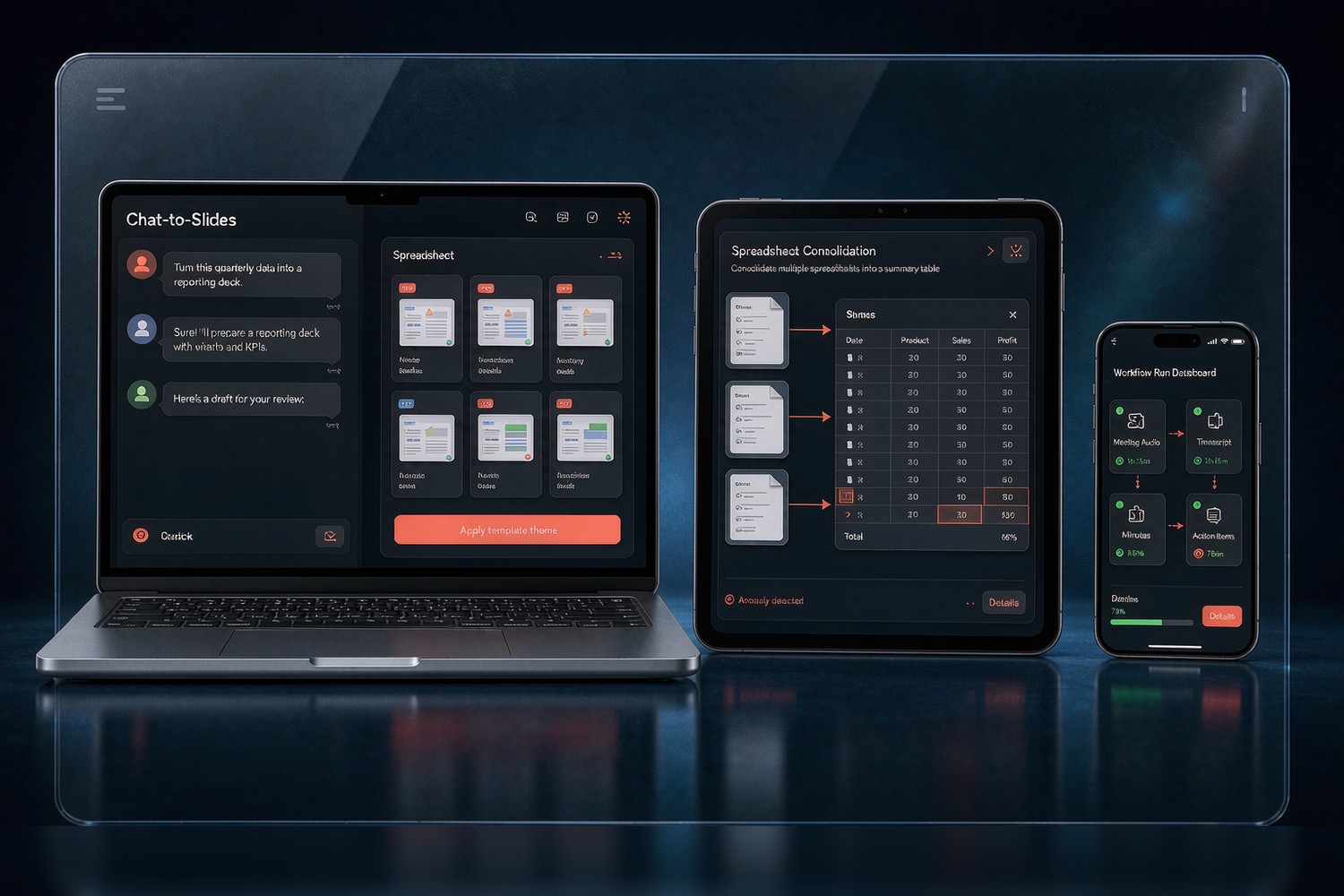
Built-in skills cover high-frequency office work. PPT master: give it material or a topic and it drafts a reporting deck on your company template; existing decks can be batch-revised with visuals unified. Spreadsheets: multi-sheet consolidation, data reconciliation, anomaly highlighting and formula checks — finance reconciliation and weekly sales reports become a hand-off, not a chore. Meeting minutes: audio is transcribed, decisions and action items are extracted automatically, tasks are assigned to owners and followed up. Document writing: notices, policies, proposals and contract drafts drafted in your company's voice, plus policy Q&A. Skills are not isolated tools — they combine inside workflows, e.g. "meeting audio → transcript → minutes → task assignment" runs as one chain. The library keeps growing; the HQ edition supports custom skills for your business.
Can it integrate with our existing ERP, CRM, OA or WeChat Work? How?
Yes — that is the foundation of "unified orchestration". The Advanced and HQ editions include system connectors for collaboration entry points such as WeChat Work and DingTalk, plus standard APIs and common databases of ERP, CRM and OA systems, consolidating data scattered across systems into one entry point — check inventory, customer records or approval status with one question in the workbench instead of hopping between systems. To be candid: feasibility and effort depend on whether those systems expose APIs and how standard they are — well-documented standard APIs usually connect by configuration, while deeply customised legacy systems need assessment and separate quoting. Before signing we deliver an integration assessment list stating what can connect, how, and the effort involved — we do not sign on a verbal "it will connect". Details confirmed in discussion.
How is data security handled? Will company material leak?
Four layers of control. Access: permissions are tiered by department and role, covering which agents are usable and which data visible, with sensitive actions requiring authorisation. Isolation: company material in the knowledge base serves only your company's answers and generation — never mixed across customers — with visibility scopes configurable per policy. Audit: conversations and API calls are logged, exportable and traceable to people and steps. Deployment: companies with strict data requirements can choose dedicated deployment, running the platform on your own servers. An honest note as well: when cloud model services are used, avoid entering core secrets that must be strictly isolated under NDAs into conversations; during implementation we draw up a red-line list of what may and may not enter the platform and configure it into the system.
AI tools often get abandoned after two weeks. How do you avoid becoming shelf-ware?
Three things turn the tool into a daily habit. Right scenarios first: before launch we help pick "high-frequency, repetitive, rule-based" tasks — reconciliation, weekly reports, minutes, policy Q&A — the things people touch every day, rather than flashy extras. Embedded where people work: the agent entry lives in WeChat Work and the unified workbench, so nobody installs yet another app. Visible management: the ops dashboard tracks usage frequency and outcomes per agent, showing clearly what works and what nobody uses, and our consultants keep tuning scenarios based on that data. Experience shows that when the first batch of scenarios solves something that "hurts every week", people simply keep using it; the scope of accompanying operations services is written into the delivery plan at signing.
How long from signing to launch? What should we prepare?
The standard rhythm is two to four weeks (per the delivery plan confirmed in discussion). Week one: scenario workshops and agent building — list the most repetitive office routines and configure three to five to go live first. Weeks two to three: knowledge-base onboarding and system integration — policies, product material and past reports go into the knowledge base; systems with standard APIs get connectors configured. Then trial use and tuning. You prepare: source material for high-frequency scenarios (current spreadsheets, reporting templates, sample meeting recordings, common policy documents), admin cooperation on WeChat Work or DingTalk, and one internal coordinator who knows the business — no technical background needed. We recommend starting small: have staff using one real scenario in week one beats waiting for a grand all-in-one plan.
Is there maintenance after launch? Do skills and agents keep improving?
Yes. Delivery includes after-sales maintenance and one-to-one support: platform availability, security updates and incident response are on us — issues go through the contact channels (WeChat Work customer service or office@flamingotech.cc) with responses typically within one business day. The skill library and platform iterate continuously: new office skills, model upgrades, and changes to WeChat Work or DingTalk interfaces are tracked and adapted by our team, with updates announced in release notes. Just as important is the operational side: launch is not the end — based on dashboard data we review periodically, help turn newly spotted repetitive work into new agents, and retire or adjust the unused ones so the platform fits the business better over time. Service scope and response times follow the signed agreement.
All editions are annual fees — are there other charges? How is it priced?
Pricing follows three annual editions (Basic ¥8,999 / Advanced ¥28,999 / HQ ¥46,999), covering platform use, included skills, maintenance and version upgrades. Only two categories of extra cost may arise, both confirmed in writing in advance. Deep customisation: if you need business-specific skills or integration with deeply customised legacy systems, that is quoted separately by actual workload. Resource fees: model inference consumption varies with usage — Basic includes a regular allowance, and increments from heavy use or HQ's dedicated routing are settled by actual consumption at rates stated at signing. Beyond that there are no hidden charges. When comparing any AI-agent product, we advise asking three questions: is model usage billed separately, how is custom development priced, and what happens beyond the quota — these are the most common fee traps in this category. Details follow the signed agreement.